Local Network Speeds not reaching 2.5gb - Home Network
What happened
After firing up UNRAID on my Node 2, I noticed my speeds were being bottlenecked by my home network network-speeds (home-lab). network-speeds
Unraid Interface Data
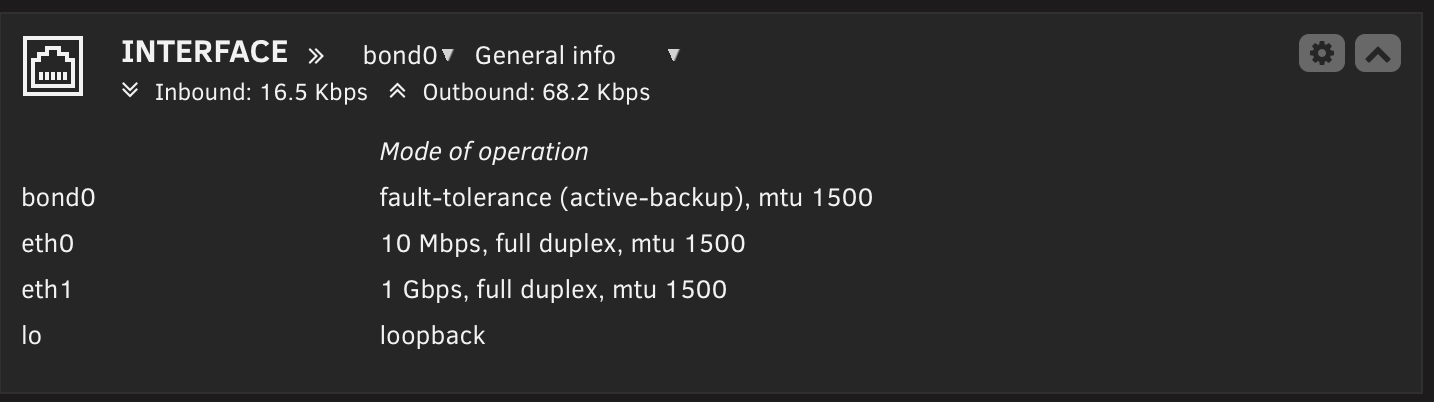
I also connected to my PROXMOX node on Node 1 and observed the same issue.
I checked my switch for more details by port and found certain network ports were limited to 10/100 Mbps. This is unacceptable; my goal is 2.5 Gb speeds across all nodes in my network.
Network Switch Interface
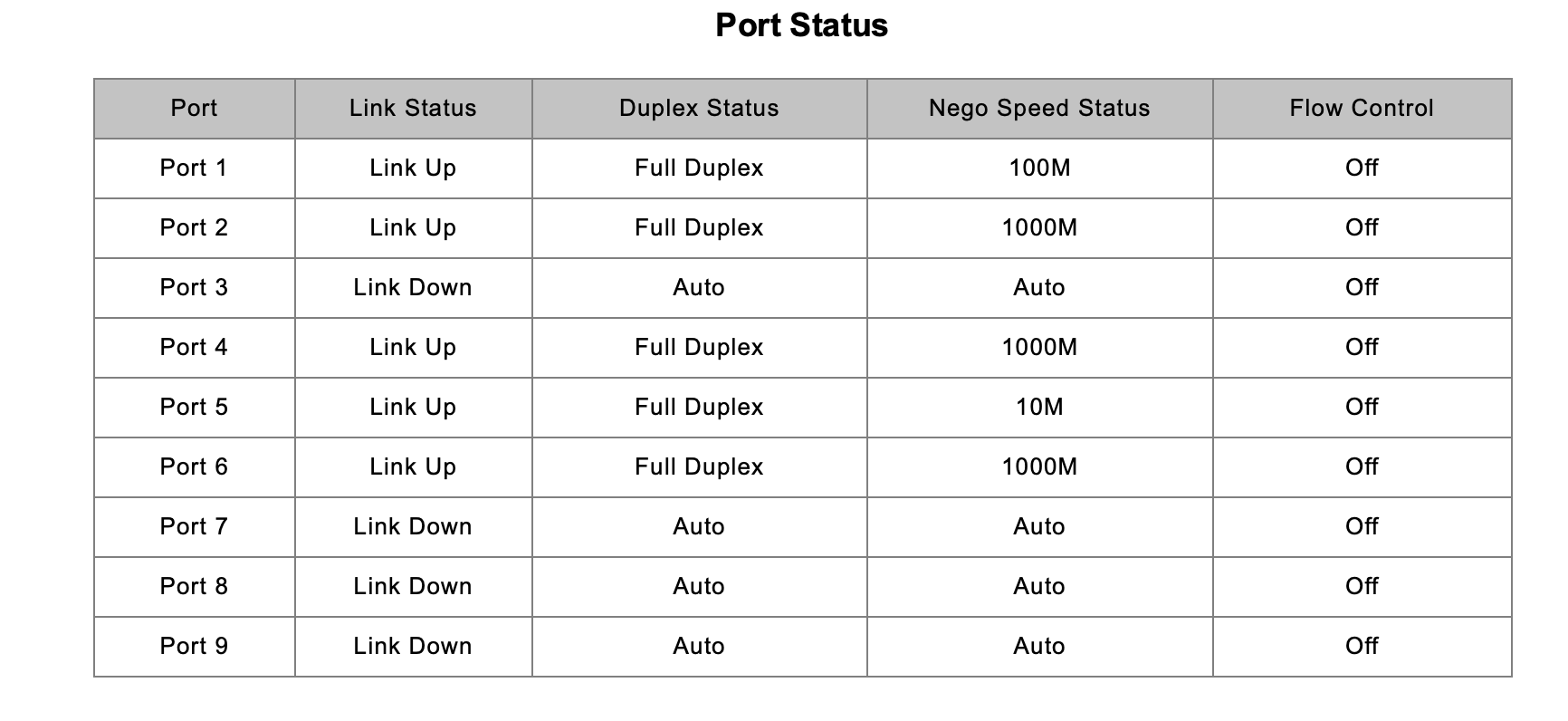
Port 5 speeds are 10 Mbps and port 1 is locked at 100 Mbps
Root cause
- UNRAID defaults network speeds to 1 Gb and needs to be changed manually through the terminal
- PROXMOX external adapters need to be enabled and passed through to the machines to use the 2.5 Gb adapter
The fix
Proxmox Solution
UNRAID Solution
Prevention
Ensure all network adapters are passed through to machines and set to their rated speeds.
Tests/Debugging
Since I'll be tinkering with live hardware, I'll power down all nodes. It's a good time to modify the server and adjust the network because it's 1 a.m. and everyone in the house is asleep. I also don't want to accidentally shut off a system and corrupt it.
Organize Networking Wires and Server Rack
Up to Date Server Network Configuration
First, I need to ensure I know which port is which on my server. I had it organized before, but while debugging other issues I lost track. This won't fix the problem, but it will help me figure out which port connects to which device and which NIC.
Critical Discovery #1
While trying to figure out the issues with my rack, I rewired the networking through the patch panel and noticed one of my CAT6 pass-through keystone jacks wasn't working when passing the internet from my router. I then moved it to keystone 2 and it worked perfectly.
I discovered that my patch panels first keystone jack had bent pins where the RJ45 passed through. I double-checked the connection with my RJ45 tester and verified that the jack was causing the issue.
Prior to this test, I was getting 10 Mbps on this port and didn't know why. Now I can safely say it was because one of the pins was bent.
In the near future I will need to get a new keystone jack and maybe a new patch panel. For now, I'll shift all my connections down one and test.
Results
After this change, I kept only three connections plugged in:
- Port 1: Internet from router
- Port 2: Node 1 motherboard RJ45 port
- Port 3: Node 1 NIC 2.5 Gb adapter RJ45 port
After these changes, ports 1 and 2 are getting their rated speeds (1 gigabit). Port 3, which is my 2.5 Gb adapter, isn't showing as up. When I first powered on node 1, it showed a 1 gigabit connection, but I assume after PROXMOX fully booted it removed that connection because I never set the node to route traffic through it and I still need to update its drivers.
Switch Port Connections
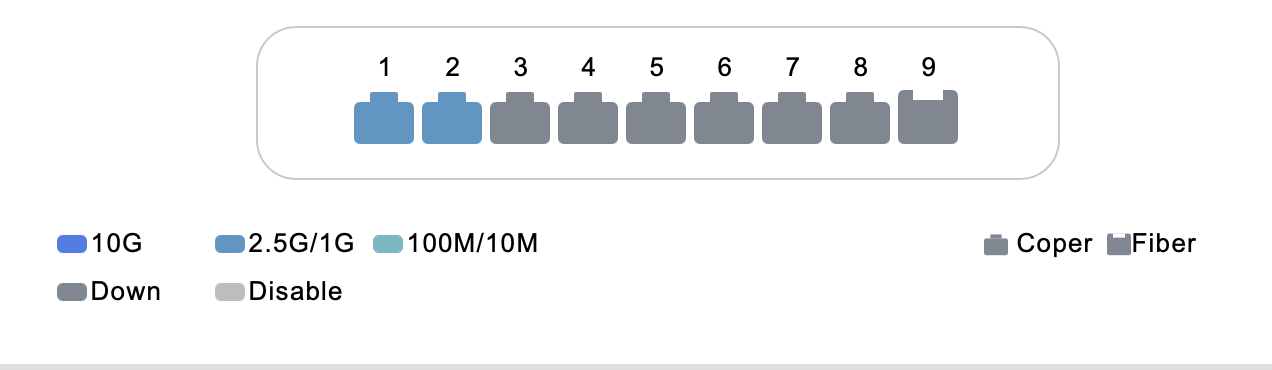
Next step is to change the PROXMOX1 network configuration and update drivers to get a 2.5 Gb connection from my switch through port 3.
Enable NIC on Proxmox and update drivers
Proxmox Machine - Node 1
Up-to-date network configuration - home-lab · Network
After fixing the previous issue, I noticed that when I turned on Node 1, my switch detected all my NIC port connections. But once PROXMOX booted, it disabled my PCIE Dual 2.5gb adapter NIC because it wasn't being used or configured.
Missing Port 3 2.5 Gb connection
All I needed to do was ensure my vmbr0 was passed through my Linux bridge and not the motherboard NIC, then test the speeds. While I'm at it, I'll also update my NIC drivers in case bugs were patched in previous versions.
Proxmox driver update on terminal
apt update && apt dist-upgrade
Results
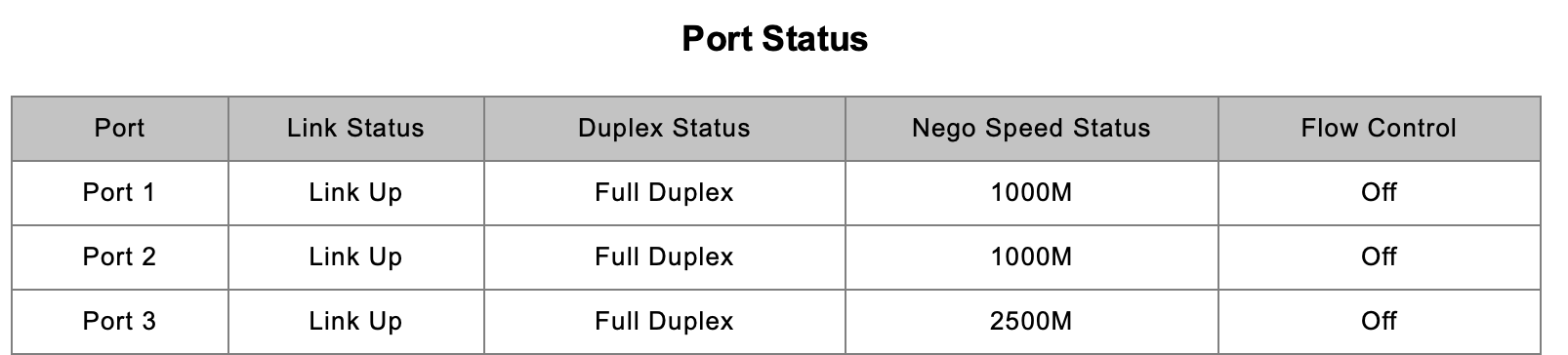
After updating my PROXMOX machine to enable my NIC port and route traffic through it, I verified I was getting a 2.5 Gb connection through my switch.
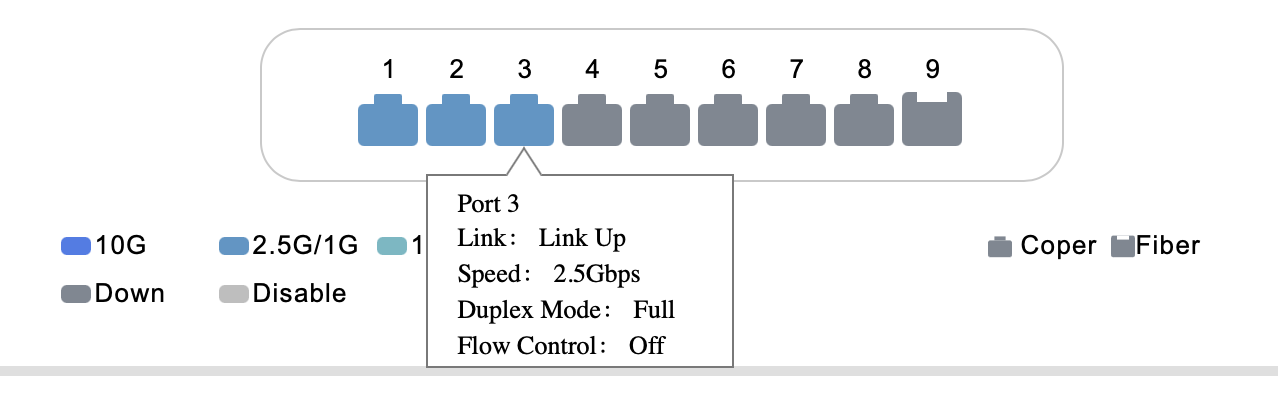
The results were positive and we were able to gain a 2.5 Gb connection to Node 1.
New Port Mapping on Switch
- Port 1: Main router connection
- Port 2: Node 1 motherboard 1 Gb connection
- Port 3: Node 1
NIC2.5 Gb port connection
UNRAID Force speed / Driver Updates
UNRAID - Node 2
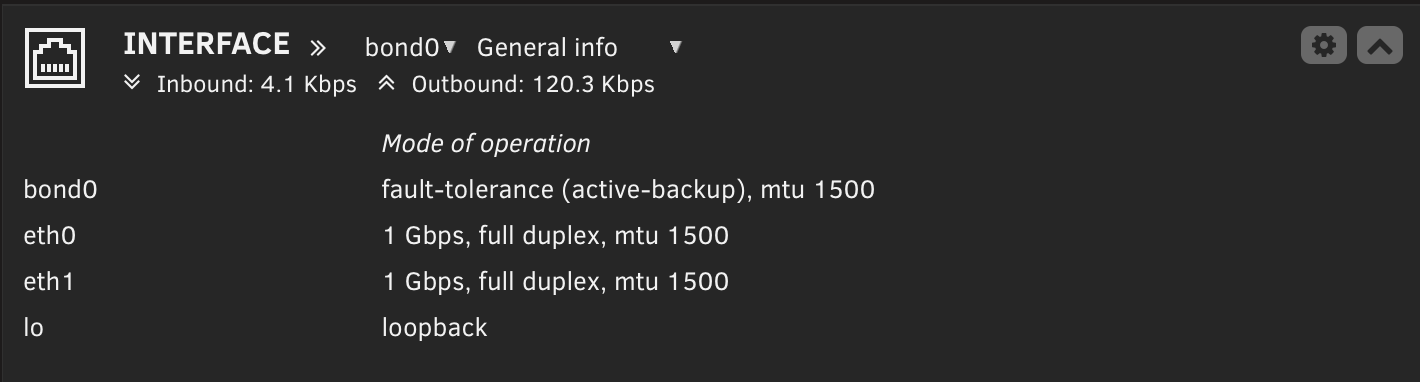
On my UNRAID interface it shows both RJ45 ports active.
I configured two connections to my switch
- Motherboard connection for 1 Gb speeds
- 2.5 Gb USB adapter
You can read more about this (LINK TO UNRAID NETWORK WHEN FINISHED)
For some reason, on my UNRAID interface I'm getting 1 Gb speeds on both devices and it also shows that on my managed switch interface.
UNRAID Network Interface
Managed Switch Speed Interface

My theory is Linux defaults the speeds on my adapters; I have to manually set the speeds or update the drivers for my machine to support this device.
First, before I do any checks, I have to ensure I know which ethX is my motherboard and which is my switch to avoid messing with the wrong one.
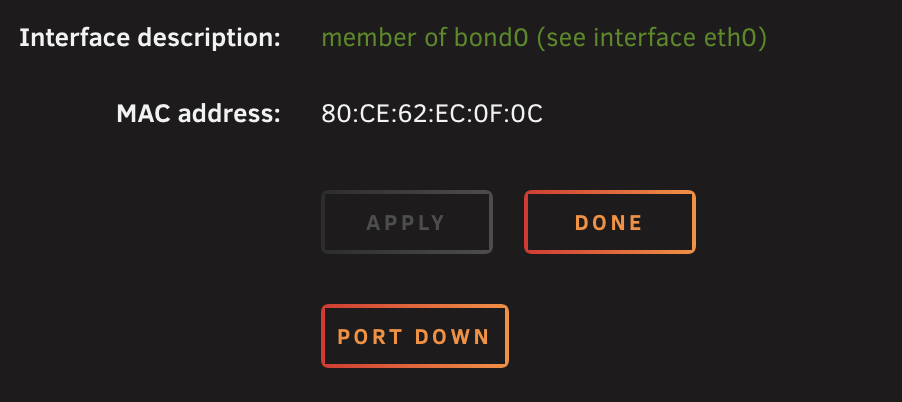
Inside my network settings, it seems UNRAID made my dual ports a bond by default so they share one configuration under eth0.
UNRAID network setting
I'll just use the ethtool ethX command in my UNRAID machine terminal and determine which device is my motherboard integrated NIC versus my USB 3.0 NIC.
Running both ethtool eth0 and ethtool eth1, I determined eth0 is my motherboard port and eth1 is my USB adapter port.
ethtool eth1 output

It shows support for 2.5 Gb speeds like my adapter. I can assume they just need to be enabled on my machine through the terminal.
Command to force 2.5 Gb speeds on my machine.
ethtool -s eth1 speed 2500 duplex full autoneg on
Results
Success
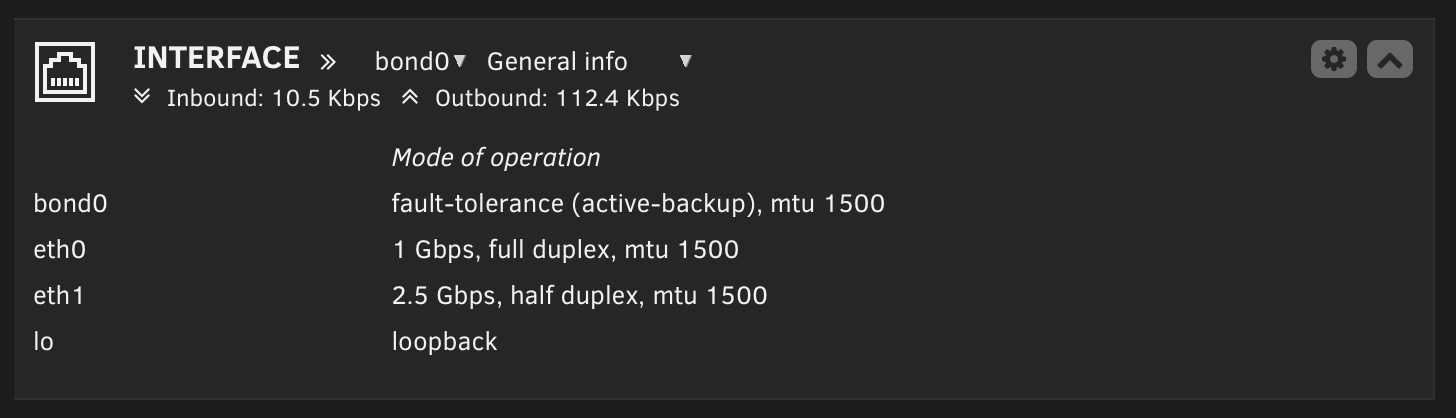

Now port 5 is getting full 2.5 Gb speeds and I can set up 2.5 Gb speeds between all of my home-lab · nodes.